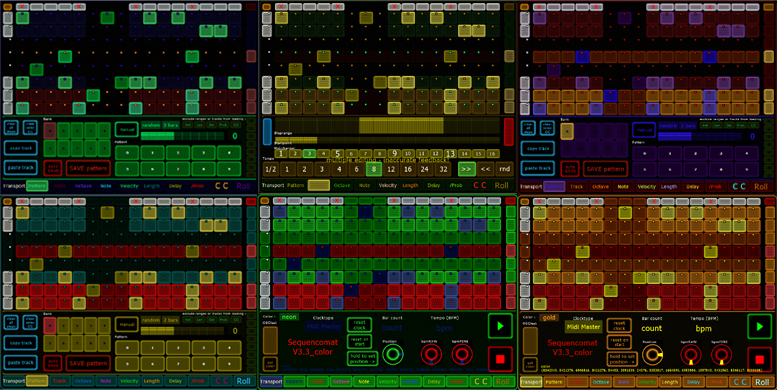
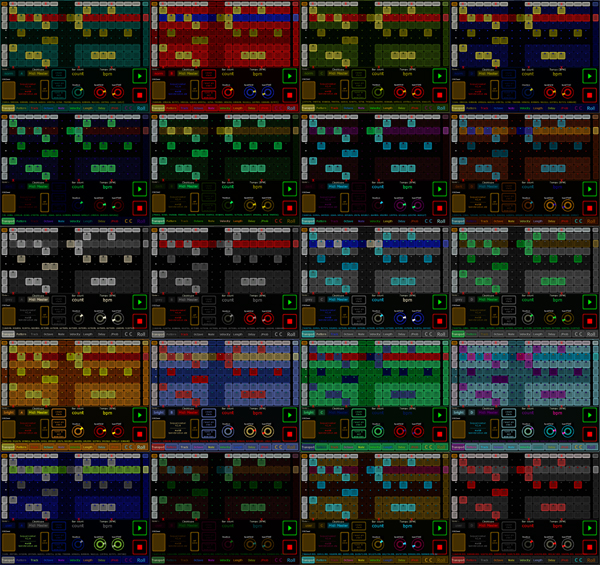
| value | meaning | color set by | color routed by scripts to |
| color[0] | main BACKGROUND color unselected TRACK OFF |
tr0 [off] | track
colors in main matrix are set to the actual status of chosen
tracks Scripts: "matrix" (triggered by changes in the color vector) "Coice.action" (triggered by changes on trackchoice button "Choice") Script "magic" set some elements of main matrix,Transport, Pattern, Track and Roller-elements to these colors: |
| color[1] | main FOREGROUND color unselected TRACK ON |
tr0 [on] | |
| color[2] | 2nd BACKGROUND color selected TRACK OFF |
tr1 [off] | |
| color[3] | 2nd FOREGROUND color selected TRACK ON |
tr1 [on] | |
| color[4] | OCTAVE | Octave.MultiSlider | Script "magic2" set all Octave-elements to this
color: |
| color[5] | NOTE | Note.MultiSlider | Script "magic2" set all Note-elements to this
color: |
| color[6] | VELOCITY | Velocity.MultiSlider | Script "magic2" set all Velocity-elements to this
color: Script "magic" set Velocity-elements of Roller to this color: |
| color[7] | LENGTH | Length.MultiSlider | Script "magic2" set all Length-elements to this
color: |
| color[8] | DELAY | Delay.MultiSlider | Script "magic2" set all Delay-elements to this
color: Script "magic" set CC X-axis Roller-elements to this color: |
| color[9] | /PROPABILITY | Prob.MultiSlider | Script "magic2" set all /Prob-elements to this
color: Script "magic" set CC Y-axis Roller-elements to this color: |
| color[10] | CONTROLCHANGE | CC.MultiSlider | Script
"magic2" set all CC-elements
to this color: Script "magic" set length of Roller to this color: |
| color[11] | ROLLPAD | Roller.Multiball | Script "magic" set some Roller-elements
to this color: |
| color[12] | LED unchosen track | tled0 [off] | see color [0,
1, 2, 3] The trackLED also indicate the propability status of a step: BLACK - no tone --- BACKROUND color - tone is played (if set) At the moment this is done by lightvectors only (e.g. "tr0step"), not colors! Therefore you only define the off stati of the 2 LEDs => got to rework that with next update! |
| color[13] | LED chosen track | tled1 [off] |
| detailed table of "color" vector in Jazzmutnant Lemur module "SequencomatV3_colors" | |||
| value | meaning | color set by | color routed by scripts to |
| color[0] | main BACKGROUND color unchosen TRACK OFF |
tr0 [off] | Use: Set track
colors in main matrix to the actual status of chosen tracks Scripts: "matrix" (triggered by changes in the color vector) "Coice.action" (triggered by changes on trackchoice button "Choice") decl c,d,e,f; c=color[0,1]; d=color[2,3]; e=color[12]; f=color[13]; if (Choice.x[0]==1) (setattribute(tr0,'color',d) && setattribute(tled0,'color',f)); if (Choice.x[1]==1) (setattribute(tr1,'color',d) && setattribute(tled1,'color',f)); if (Choice.x[2]==1) (setattribute(tr2,'color',d) && setattribute(tled2,'color',f)); if (Choice.x[3]==1) (setattribute(tr3,'color',d) && setattribute(tled3,'color',f)); if (Choice.x[4]==1) (setattribute(tr4,'color',d) && setattribute(tled4,'color',f)); if (Choice.x[5]==1) (setattribute(tr5,'color',d) && setattribute(tled5,'color',f)); if (Choice.x[6]==1) (setattribute(tr6,'color',d) && setattribute(tled6,'color',f)); if (Choice.x[7]==1) (setattribute(tr7,'color',d) && setattribute(tled7,'color',f)); if (Choice.x[0]==0) (setattribute(tr0,'color',c) && setattribute(tled0,'color',e)); if (Choice.x[1]==0) (setattribute(tr1,'color',c) && setattribute(tled1,'color',e)); if (Choice.x[2]==0) (setattribute(tr2,'color',c) && setattribute(tled2,'color',e)); if (Choice.x[3]==0) (setattribute(tr3,'color',c) && setattribute(tled3,'color',e)); if (Choice.x[4]==0) (setattribute(tr4,'color',c) && setattribute(tled4,'color',e)); if (Choice.x[5]==0) (setattribute(tr5,'color',c) && setattribute(tled5,'color',e)); if (Choice.x[6]==0) (setattribute(tr6,'color',c) && setattribute(tled6,'color',e)); if (Choice.x[7]==0) (setattribute(tr7,'color',c) && setattribute(tled7,'color',e)); Script "magic" set some global elements to these colors: setattribute(Choice2,'color',color[2,0]); setattribute(Choice,'color',color[0,2]); setattribute(Mutestep,'color',color[0,1]); setattribute(Mutetrack,'color',color[0,1]); setattribute(Function,'color',color[0,1]); setattribute(SequencomatV3,'color',color[0]); setattribute(SequencomatV3.Text,'color',color[3]); Script "magic" set some Transport-elements to these colors: setattribute(Transport,'color',color[0]); setattribute(Transport.color,'color',color[1]); setattribute(Transport.Text3,'color',color[2]); setattribute(Transport.Colortype,'color',color[0]); setattribute(Transport.Clocktype,'color',color[1]); setattribute(Transport.Resetonstart,'color',(color[0,1])); setattribute(Transport.Resetclock,'color',(color[0,1])); setattribute(Transport.Holdposition,'color',(color[0,1])); setattribute(Transport.Position,'color',(color[0,1])); setattribute(Transport.bar_beat,'color',(color[1])); setattribute(Transport.bpmRAW,'color',(color[2,3])); setattribute(Transport.bpmFINE,'color',(color[2,3])); setattribute(Transport.bpmmon,'color',(color[3])); Script "magic" set some Pattern-elements to these colors: setattribute(Pattern.Bank,'color',(color[1,2])); setattribute(Pattern.Pattern,'color',(color[1,2])); setattribute(Pattern,'color',color[3]); setattribute(Text_Pattern,'color',color[3]); setattribute(Pattern.Patternjump,'color',color[3]); setattribute(Pattern.Patternjumptype,'color',color[3]); setattribute(Pattern.Patternmode,'color',color[3]); setattribute(Pattern.Patternrange,'color',color[3]); setattribute(Pattern.Monitor,'color',color[3]); Script "magic" set some Track-elements to these colors: setattribute(Track,'color',color[2]); setattribute(Text_Track,'color',color[2]); setattribute(Track.Tempo,'color',(color[2,4])); setattribute(Track.Direction,'color',(color[2,4])); setattribute(Track.ChanNote,'color',(color[1,4])); setattribute(Track.Startpoint,'color',(color[1])); setattribute(Track.Steprange,'color',(color[1,4])); Script "magic" set some Roller-elements to these colors: setattribute(Roller.Transpose,'color',color[0]); setattribute(Roller.Note,'color',color[1]); setattribute(Roller.Note2,'color',color[1]); setattribute(Roller.Notemc,'color',color[1]); setattribute(Roller.Mode,'color',(color[0,1])); setattribute(Roller.Length,'color',color[10]); |
| color[1] | main FOREGROUND color unchosen TRACK ON |
tr0 [on] | |
| color[2] | 2nd BACKGROUND color chosen TRACK OFF |
tr1 [off] | |
| color[3] | 2nd FOREGROUND color chosen TRACK ON |
tr1 [on] | |
| color[4] | OCTAVE | Octave.MultiSlider | Script "magic2" set all
Octave-elements to this color: setattribute(Octave,'color',color[4]); setattribute(Octave.MultiSlider,'color',color[4]); setattribute(Octave.Text,'color',color[4]); setattribute(Octave.Random,'color',color[4]); setattribute(Octave.Setall,'color',color[4]); setattribute(Octave.Pads,'color',(color[4,4])); setattribute(Octave.Trans,'color',(color[4,4])); setattribute(Text_Octave,'color',color[4]); |
| color[5] | NOTE | Note.MultiSlider | Script "magic2" set all
Note-elements to this color: setattribute(Note,'color',color[5]); setattribute(Note.MultiSlider,'color',color[5]); setattribute(Note.Text,'color',color[5]); setattribute(Note.Random,'color',color[5]); setattribute(Note.Setall,'color',color[5]); setattribute(Note.Pads,'color',color[5,5]); setattribute(Note.Trans,'color',color[5,5]); setattribute(Text_Note,'color',color[5]); |
| color[6] | VELOCITY | Velocity.MultiSlider | Script "magic2" set all
Velocity-elements to this color: setattribute(Velocity,'color',color[6]); setattribute(Velocity.MultiSlider,'color',color[6]); setattribute(Velocity.Text,'color',color[6]); setattribute(Velocity.Random,'color',color[6]); setattribute(Velocity.Setall,'color',color[6]); setattribute(Velocity.Pads,'color',color[6]); setattribute(Velocity.Range,'color',color[6]); setattribute(Text_Velocity,'color',color[6]); Script "magic set Velocity-elements of Roller to this color: setattribute(Roller.RangeVel,'color',color[6]); setattribute(Roller.MonitorVel,'color',color[6]); |
| color[7] | LENGTH | Length.MultiSlider | Script "magic2" set all
Length-elements to this color: setattribute(Length,'color',color[7]); setattribute(Length.MultiSlider,'color',color[7]); setattribute(Length.Text,'color',color[7]); setattribute(Length.Random,'color',color[7]); setattribute(Length.Setall,'color',color[7]); setattribute(Length.Pads,'color',color[7]); setattribute(Length.Range,'color',color[7]); setattribute(Text_Length,'color',color[7]); |
| color[8] | DELAY | Delay.MultiSlider | Script "magic2" set all
Delay-elements to this color: setattribute(Delay,'color',color[8]); setattribute(Delay.MultiSlider,'color',color[8]); setattribute(Delay.Text,'color',color[8]); setattribute(Delay.Random,'color',color[8]); setattribute(Delay.Setall,'color',color[8]); setattribute(Delay.Pads,'color',color[8]); setattribute(Delay.Range,'color',color[8]); setattribute(Text_Delay,'color',color[8]); Script "magic" set CC X-axis Roller-elements to this color: setattribute(Roller.RangeCCX,'color',color[8]); setattribute(Roller.MonitorXCC,'color',color[8]); setattribute(Roller.CCXon,'color',color[8]); setattribute(Roller.ccX1,'color',color[8]); setattribute(Roller.ccX10,'color',color[8]); setattribute(Roller.ccXmc,'color',color[8]); |
| color[9] | /PROPABILITY | Prob.MultiSlider | Script "magic2" set all
/Prob-elements to this color: setattribute(Prob,'color',color[9]); setattribute(Prob.MultiSlider,'color',color[9]); setattribute(Prob.Text,'color',color[9]); setattribute(Prob.Setall,'color',color[9]); setattribute(Prob.Pads,'color',color[9]); setattribute(Prob.ProbIndikator,'color',color[9]); setattribute(Text_Prob,'color',color[9]); setattribute(SetProb,'color',color[9]); setattribute(SetProb.Switches,'color',color[9]); Script "magic" set CC Y-axis Roller-elements to this color: setattribute(Roller.RangeCCY,'color',color[9]); setattribute(Roller.MonitorYCC,'color',color[9]); setattribute(Roller.CCYon,'color',color[9]); setattribute(Roller.ccY1,'color',color[9]); setattribute(Roller.ccY10,'color',color[9]); setattribute(Roller.ccYmc,'color',color[9]); |
| color[10] | CONTROLCHANGE | CC.MultiSlider | Script "magic2" set all
CC-elements to this color: setattribute(CC,'color',color[10]); setattribute(CC.MultiSlider,'color',color[10]); setattribute(CC.Text,'color',color[10]); setattribute(CC.Setall,'color',color[10]); setattribute(CC.Pads,'color',color[10]); setattribute(CC.Pads2,'color',color[10]); setattribute(CC.Range,'color',color[10]); setattribute(CC.Random,'color',color[10]); setattribute(CC.Text,'color',color[10]); setattribute(Text_CC,'color',color[10]); setattribute(SetCC,'color',color[10]); setattribute(SetCC.Midichannel,'color',color[10]); setattribute(SetCC.Controller10,'color',color[10]); setattribute(SetCC.Controller1,'color',color[10]); Script "magic" set length of Roller to this color: setattribute(Roller.Length,'color',color[10]); |
| color[11] | ROLLPAD | Roller.Multiball | Script "magic" set some
Roller-elements to this color: setattribute(Roller,'color',color[11]); setattribute(Text_Roll,'color',color[11]); setattribute(Roller.Multiball,'color',color[11]); setattribute(Roller.RangeTI,'color',color[11]); setattribute(Roller.MonitorTI,'color',color[11]); |
| color[12] | LED unchosen track | tled0 [off] | see color [0,
1, 2, 3] The trackLED also indicate the propability status of a step: BLACK - no tone BACKROUND color - tone is played (if set) At the moment this is done by lightvectors only (e.g. "tr0step"), not colors! Therefore you only define the off stati of the 2 LEDs |
| color[13] | LED chosen track | tled1 [off] | |